Approve a Work Code Request
-
Select the desired Business Process in the Business Process area.
-
Select the desired Workflow Setting to enable the Edit button.
-
Click Edit to show the Parameters page for the selected workflow.
| >>> IMPORTANT <<< |
|---|
| Whether a work code requires approval is determined by the configuration of the work code in Setup > Codes. Additionally, Notification Groups and Notification Group Assignments must be configured to tell the system who or which group of people to notify. |
The Approve a Work Code Request business process controls whether notifications are sent to a group of people. When Notices are activated, a work code requiring approval will automatically send a notification to a group of people for approval.
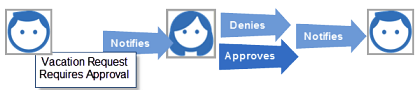
| Field Name | Approve a Work Code Request Field Descriptions |
|---|---|
| Legacy | Keeps the previous work code work flow the same. This is the default setting. |
| Notices | Turns approval notifications ON when active for all work code types. |
| Field Name | Approve a Work Code Request Notification Parameter Field Descriptions |
|---|---|
| Approval Expiration Date Offset | Controls when the work code approval status
expires and the approval setting disables. This setting is applicable
when the work code has been configured to require approval. For
example:
|
| Approval Reminder Frequency | Controls the frequency of the notification
and applicable when the work code has been configured to require
approval. Simply put, how often do you want to alert the approver
or approvers of the request? This applies across all work codes
so all work codes carry the same frequency. Send a reminder every
X days.
|
Work Code Trade
The Work Code Trade business process gives employees the ability to confirm shift trade transactions amongst each other. If an approval is needed, acknowledging the trade transaction only tells the Approver that both employees are aware and in agreement of the shift trade. Acknowledging a trade is not an approval.
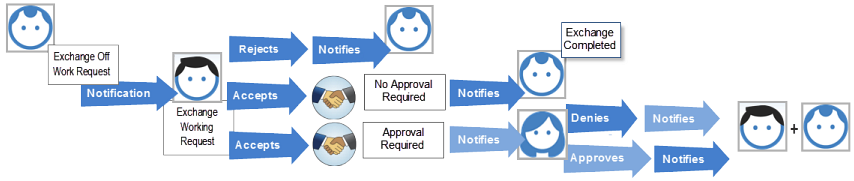
| Field Name | Work Code Trade Field Descriptions |
|---|---|
| Legacy | Keeps the previous Cover work code workflow the same - this means the trade acknowledgment feature is not available. This is the default setting. |
| Acknowledgments | Turns notifications and shift trade acknowledgments ON when active. |
| Field Name | Work Code Trade Notification Parameter Field Descriptions |
|---|---|
| Approval Expiration Date Offset | Controls when the Cover work code approval
status expires and the approval setting disables relative to the
target date. This setting is applicable when the work code has been
configured to require approval. For example:
|
| Approval Reminder Frequency | Controls the frequency of the notification
and applicable when the work code has been configured to require
approval. This applies across all Cover type work codes so all Cover
type work codes carry the same frequency. Send a reminder every
X days.
|
| Acknowledgment Expiration Date Offset | Controls when the Accept Trade/Reject Trade
status expires and the acknowledgment setting is no longer available.
For example:
|
| Acknowledgment Reminder Frequency | Controls the frequency of the reminder. Essentially,
how often do you want to alert the person of this trade? Send a
reminder every X days.
|
Work Code Trade Cancellation
This is used to give employees the ability to confirm shift trade cancellations amongst each other. If an approval is needed, acknowledging the trade cancellation tells the Approver that both employees are aware and in agreement of the shift trade cancellation. Acknowledging a trade cancellation is not an approval.This is used to give employees the ability to confirm the cancellation of a shift trade. Moreover, a shift trade work code that requires an Approver to approve the code will also require an Approver to approve the cancellation.
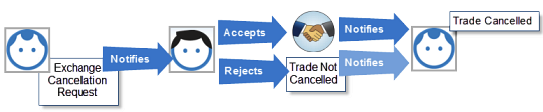
| Field Name | Work Code Trade Cancellation Field Descriptions |
|---|---|
| Legacy | Keeps the previous Cover work code work flow the same - this means the cancellation feature is not available. This is the default setting. |
| Acknowledgments | Turns notifications and the shift trade cancellation feature ON when active. |
| Acknowledgment Expiration Date Offset | Controls when the cancellation acknowledgment
status expires and the Trade Accept/Reject Cancellation settings
are no longer available. For example:
|
| Acknowledgment Reminder Frequency | Controls the frequency of the reminder. Essentially,
how often do you want to alert the person of this trade cancellation?
Send a reminder every X days.
|
| Field Name | Work Code Trade Cancellation Notification Parameter Field Descriptions |
|---|---|
| Approval Expiration Date Offset | Controls when the work code approval notification
will expire relative to the target date. This setting is applicable
when the work code has been configured to require approval. For
example:
|
| Approval Reminder Frequency | Controls the frequency of the notification
and applicable when the work code has been configured to require
approval. Send a reminder every X days.
|
| Acknowledgment Expiration Date Offset | Controls when the Cancellation Acknowledgment
setting will disable relative to the target date. For example:
|
| Acknowledgment Reminder Frequency | Controls the frequency of the reminder. Essentially,
how often do you want to alert the person of this trade cancellation?
Send a reminder every X days.
|
A cancellation can only be processed by the last two people who committed the trade. For example, suppose John trades with Ron and that trade is approved. Ron then trades that same day with Les and that trade is approved. John then decides he no longer needs the trade in effect and wants to cancel the trade, but John cannot cancel the trade because the trade is now between Ron and Les. However, Ron and Les can cancel and if they do, the trade goes into its previous state which was John and Ron, so from this point John may send a trade cancellation request.